The fastest Mac runners in the game are now generally available on Blacksmith!
Our self-hosted fleet of M4-powered builders has sped up beta customers’ builds by over 2x. The reason is twofold: using best-in-class M4 chips certainly helps - but Blacksmith’s self-hosted architecture pushes that further.
Cloud-provider Mac instances boot macOS entirely off network-attached disks: the user directory, Xcode derived data and simulator artifacts are connected over the network, while the local SSD on the Mac mini sits there unused.
Blacksmith’s runners instead leverage that local SSD, which can dish out up to 10x the bandwidth. This simplifies setup for most major build tools that expect fast access to the user directory, and makes your Mac builds fly.
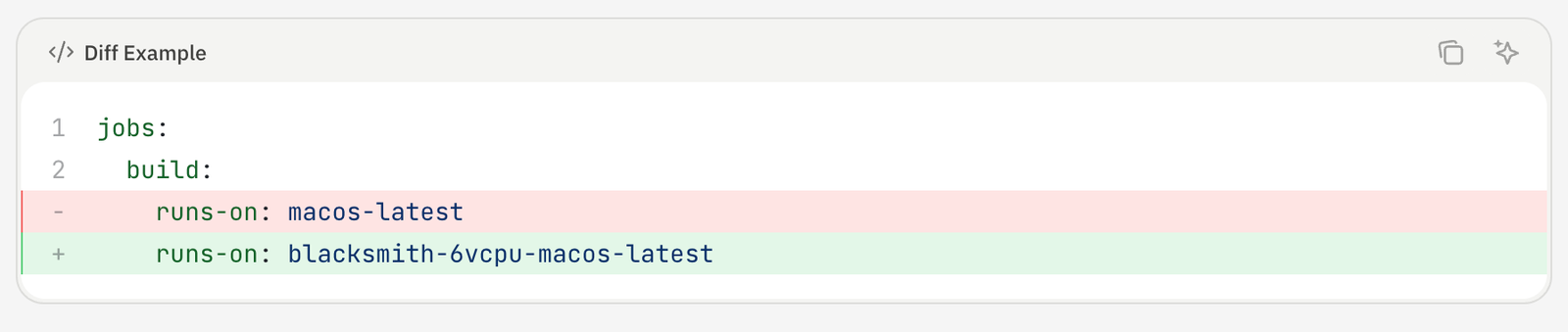
We could go on about the runners themselves - honestly, though, trying them on your workflow is so simple you should just see it for yourself. Run our migrator or change one line of code in your Actions definition.
The more interesting story is how quickly we shipped Mac runners. Elton, one of our founding engineers, took less than three weeks once we had pallets of Mac Minis landing at our data center. For context, last year’s Windows runners took us closer to three months. Both features were roughly equal in complexity - the difference was in how we structured the development cycle.
Especially after Opus 4.5, coding agents have hit an inflection point that is magical for closed-loop development cycles.
The first insight is simple: an agent working in a closed loop can verify its own work and move to the next task without waiting on a human. An agent working in an open loop can't. Every time a human has to step in to validate, test, or diagnose something, the task effectively pauses. Multiply that across a project with dozens of moving pieces and the slowdown compounds quickly.
In other words, spend more time giving your agent constraints, and less time approving tool use.
The second insight is human: engineers are now constrained by context switches. Minimizing how often our engineers need to context switch between agents keeps our teams shipping fast without burning out.
With Windows runners, we weren’t providing enough constraints to our agents: we built a plan, but did not break it down so that each phase of development was self-verifying. With Mac runners, we instead defined a target goal for each phase of the project - then let the agent repeatedly iterate against that goal until it had a working prototype that Elton could take across the finish line.
Mac runners run on Apple Silicon using Apple's Virtualization.framework, wrapped in Go via the VZ library. The first step was to write a dedicated CLI sub-command that served as an end-to-end integration test: agent start mac. The success criteria for this sub-command was to be able to boot a vanilla Mac VM.
Before handing this to the agent, we made a deliberate choice to hard-code a bunch of system-level assumptions:
By adding hard-coded constraints we reduced decision-making surface area so the agent could focus on getting VZ integrated and a VM actually booting.
The agent ran with this for about an hour and a half and got it working. Without a human in the loop, the agent could run agent start mac, see whether the VM booted, and iterate - faster than with us involved, and with fewer context switches. Once it was working, we went through a few more cycles to clean up and parameterize the code, then separately added dynamic IP assignment and copy-on-write clones.
Having Firecracker already built for Linux and ARM runners also helped significantly. The agent could rely on a concrete reference implementation to work toward - again serving as a constraint for its iteration loop.
Every VM (macOS or otherwise) on Blacksmith boots from its own isolated copy-on-write filesystem. This is critical: without an isolated filesystem, each CI job couldn’t run in its own environment.
There's also a compatibility requirement: the filesystem has to be built to match GitHub's official runner images exactly. That's what makes Blacksmith a one-line code change for customers. If the environment doesn't match, workflows see behavior changes that break in subtle ways that are hard to debug.
To build and validate this, we invested in another CLI command: agent create image. This gave us a tight loop to verify that the Packer-based pipeline we built for producing filesystem images was working correctly and staying in sync with GitHub's upstream images. The agent’s goal was simple: can we create, start, and stop a VM from this image without issues?
From there, the agent would build a Packer image and run through a series of dependency installation scripts that mirror GitHub's upstream runner environment. When a script failed, the agent would diagnose what went wrong, fix the script, verify that the end state matched what GitHub's runner provides, and rebuild the image. Because the VM was booted at the end of each iteration, the agent could check that every version installed by the scripts was actually present and correct. This way we were able to work through close to 50 scripts without sinking developer time into any of them.
When orchestrating across hundreds of machines internally, we use a mix of Ansible and Argo. We already had this well-oiled structure for managing our growing fleet of Linux machines, so we equipped the agent with the necessary access to our Mac fleet and let it run Ansible to see where things broke. The loop was: push a change, run the playbook, observe failures, fix them. We kept iterating until we had a fully functioning Blacksmith agent capable of creating, running, and stopping Mac VMs across our fleet.
The hardest thing to test in isolation is the integration with GitHub itself. A VM that boots cleanly in isolation can still fail in non-obvious ways when it's actually receiving and executing a real GitHub Actions job.
The approach we settled on was to invoke real test workflows and use Blacksmith Monitors to stay on top of failures. Monitors let you configure Slack alerts for specific job or step events across your workflows. Critically, they also support VM retention: when a job fails, the VM stays alive and the Slack alert includes an SSH command to connect directly to it. That meant that when something went wrong during E2E testing, we could hand the agent an SSH string, let it connect to the live VM, investigate the issue in context, and fix it. The feedback loop stayed tight even at the integration layer.
To run this sort of closed-loop iteration, your agent needs access to an environment that mimics where your tests actually run.
This is where Testboxes come in: development environments for agents that clone your existing CI infrastructure. With a single CLI command, Testboxes deploy a VM for your agent to iterate within.

Since Testboxes are remote dev environments, there’s no conflict between multiple changes being developed simultaneously. And, since they’re copies of your CI environment, the agent gets all of the secrets and dependencies it needs to actually iterate towards its goal.
If you haven’t tried them out yet, Testboxes install fast.
curl -fsSL [https://get.blacksmith.sh](https://get.blacksmith.sh/) | sh
blacksmith auth login
blacksmith testbox initThe three-week timeline wasn't because Mac runners are simple. Apple's Virtualization.framework is not trivial, filesystem compatibility requirements are real, and deploying across a large fleet has its own complexity. What made it fast was that at every stage, we invested in constraints that kept our agent verifying its own work, and kept our engineers from continually context switching.
This is increasingly how we think about building at Blacksmith. As the models improve, the quality of what comes out of these loops improves too. The bottleneck stops being “can the agent do this?” and starts being “have we given the agent a way to check whether it did it correctly?”
Mac runners are available now. Migrating will take less time than you spent reading this post - guaranteed.